Fluidics#
The FlowCyPy.fluidics package defines the physical input of a simulation.
It describes the geometry of the flow cell, the organization of particle populations, and the statistical distributions used to generate particle properties such as size and refractive index.
Together, these objects define what enters the optical interrogation region and how particles are spatially and temporally distributed before signal generation.
The typical workflow is:
define a
FlowCyPy.fluidics.flow_cell.FlowCellbuild one or more particle populations
collect them in a
FlowCyPy.fluidics.scatterer_collection.ScattererCollectioncombine the collection with the flow cell to create a fluidic configuration
This structure is used throughout FlowCyPy to generate realistic particle arrival statistics and physically consistent event streams.
Flow cell#
The flow cell defines the channel geometry and the hydrodynamic conditions used in the simulation.
It converts the specified sample and sheath flow rates into a focused sample region and provides the velocity field used to model particle transport.
- class FlowCell#
Bases:
pybind11_objectRepresents a rectangular flow cell in which the velocity field is computed from an analytical Fourier series solution for pressure driven flow. The focused sample region is estimated from the volumetric flow rates of the sample and sheath fluids.
The analytical solution for the x direction velocity in a rectangular channel is given by:
\[u(y,z) = \frac{16b^2}{\pi^3 \mu}\left(-\frac{dp}{dx}\right) \sum_{\substack{n=1,3,5,\ldots}}^{\infty} \frac{1}{n^3} \left[ 1 - \frac{ \cosh\left(\frac{n\pi y}{2b}\right) }{ \cosh\left(\frac{n\pi a}{2b}\right) } \right] \sin\left(\frac{n\pi (z+b)}{2b}\right)\]- property area#
Return the cross sectional area of the flow cell.
- property event_scheme#
Return the default event sampling scheme used by the flow cell.
- get_sample_volume(self: FlowCyPy.fluidics.flow_cell.FlowCell, run_time: object) object#
Compute the sample volume that passes through the flow cell during the specified run time.
- Parameters:
run_time (Time) – Total run duration.
- Returns:
Sample volume transported during the run.
- Return type:
Quantity
- property height#
Return the height of the flow cell.
- property sample#
Sample fluid region of the flow cell. This region represents the focused sample area with its dimensions, volume flow rate, maximum flow speed, and average flow speed.
- sample_arrival_times(self: FlowCyPy.fluidics.flow_cell.FlowCell, n_events: SupportsInt | SupportsIndex, run_time: object, particle_flux: SupportsFloat | SupportsIndex = 0.0) object#
Sample event arrival times over a specified run duration using the flow cell’s configured event scheme.
Configured schemes#
"uniform-random"Draw
n_eventsrandom times uniformly over the run duration and sort them."linear"Generate
n_eventslinearly spaced times over the run duration. This is particularly useful for debugging and deterministic tests."poisson"Generate arrival times from a Poisson process with rate
particle_flux. In this mode,n_eventsis ignored and the number of returned events is stochastic.
- param n_events:
Number of events to generate for deterministic schemes.
- type n_events:
int
- param run_time:
Total duration over which events are sampled.
- type run_time:
Time
- param particle_flux:
Event rate in events per second used only when
event_scheme="poisson".- type particle_flux:
float, optional
- returns:
Event arrival times expressed in seconds.
- rtype:
Quantity
- sample_transverse_profile(self: FlowCyPy.fluidics.flow_cell.FlowCell, n_samples: SupportsInt | SupportsIndex) tuple[object, object, object]#
Sample the transverse velocity profile of the focused sample region.
This method draws random transverse coordinates within the sample region and evaluates the corresponding local axial velocity in the channel.
By default, coordinates are sampled with probability proportional to the local axial velocity. This gives flux-weighted trajectory sampling. If the flow cell was constructed with
transverse_sampling_scheme="uniform-random", coordinates are sampled uniformly over the sample region instead.- Parameters:
n_samples (int) – Number of transverse samples to generate.
- Returns:
Tuple containing:
y coordinates
z coordinates
local axial velocities
- Return type:
tuple
- seed(self: FlowCyPy.fluidics.flow_cell.FlowCell, value: SupportsInt | SupportsIndex) None#
Seed all stochastic flow-cell sampling operations.
- property sheath#
Sheath fluid region of the flow cell. This region represents the remaining sheath area with its dimensions, volume flow rate, maximum flow speed, and average flow speed.
- property transverse_sampling_scheme#
Return the transverse position sampling scheme used by the flow cell.
- property width#
Return the width of the flow cell.
Fluidics system#
The fluidics system combines a flow cell and a scatterer collection, then generates population-resolved event blocks for an acquisition.
- class Fluidics(scatterer_collection, flow_cell)[source]#
Bases:
object- Parameters:
flow_cell (FlowCell)
- generate_event_collection(run_time, sampling_rate, random_state=None)[source]#
Generate the event collection for all configured populations.
- Parameters:
run_time (Time) – Acquisition duration.
sampling_rate (Frequency) – Sampling rate used for gamma model occupancy calculations.
random_state (int | Generator | None)
- Returns:
Population resolved event blocks.
- Return type:
EventCollection
Scatterer collection#
The scatterer collection is the container that stores all particle populations present in the simulated sample.
It provides a convenient interface for combining multiple populations, applying dilution, and passing the resulting sample definition to the fluidics engine.
- class ScattererCollection#
Bases:
pybind11_objectCollection of particle populations used by a flow-cytometry simulation.
The collection is deliberately lightweight: it stores population objects and applies operations that affect the sample as a whole. Concentrations are exposed as Pint quantities in particle / liter, while the C++ implementation stores their magnitudes in SI units.
- Parameters:
populations (sequence of BasePopulation, optional) – Initial populations. The default is an empty collection.
Notes
Population objects are held by shared reference. Consequently,
collection.dilute(2)also updates the concentration observed on each population object passed to the constructor.- add_population(self: FlowCyPy.fluidics.scatterer_collection.ScattererCollection, *args) FlowCyPy.fluidics.scatterer_collection.ScattererCollection#
Append one or more populations.
- Parameters:
*population (BasePopulation) – One or more population objects to append.
- Returns:
This collection, allowing calls to be chained.
- Return type:
- property concentrations#
Concentration of each population.
- Returns:
Concentrations in particle / liter, in collection order.
- Return type:
list of pint.Quantity
- dilute(self: FlowCyPy.fluidics.scatterer_collection.ScattererCollection, factor: SupportsFloat | SupportsIndex) None#
Divide every population concentration by
factor.- Parameters:
factor (float) – Finite, strictly positive dilution factor.
- Raises:
ValueError – If
factoris not finite and greater than zero.
- get_population_ratios(self: FlowCyPy.fluidics.scatterer_collection.ScattererCollection) list[float]#
Return each population’s fraction of the total concentration.
- Returns:
One dimensionless ratio per population, in collection order.
- Return type:
list of float
- Raises:
ValueError – If the total concentration is zero.
- property populations#
Populations stored in the collection.
Getting this property returns a Python list. Assigning a list replaces the collection contents; population objects themselves continue to be shared with Python.
- set_concentrations(self: FlowCyPy.fluidics.scatterer_collection.ScattererCollection, values: object) None#
Set population concentrations.
- Parameters:
values (pint.Quantity or sequence of pint.Quantity) – A single concentration applied to every population, or one concentration per population. Values must be convertible to particle / liter.
- Raises:
ValueError – If a sequence has the wrong length or a value has incompatible units.
Population models#
Population classes describe the physical properties of the particles present in the sample.
A population typically specifies its concentration, refractive index model, diameter distribution, and the sampling strategy used to instantiate individual particles during simulation.
Sphere population#
Use this class for homogeneous spherical particles.
- class SpherePopulation#
Bases:
BasePopulationSpherical population with distribution based physical parameters.
See also
CoreShellPopulationpopulation with separate core and shell properties.
- sample(self: FlowCyPy.fluidics.populations.SpherePopulation, number_of_samples: SupportsInt | SupportsIndex) dict#
Sample particle properties from the population distributions.
- Parameters:
number_of_samples (int) – Number of particles to sample.
- Returns:
Dictionary containing sampled arrays with units:
”MediumRefractiveIndex” : RIU
”RefractiveIndex” : RIU
”Diameter” : meter
- Return type:
dict[str, pint.Quantity]
Core-shell population#
Use this class for layered particles composed of a core and a shell with distinct optical properties.
- class CoreShellPopulation#
Bases:
BasePopulationCore shell population with distribution based physical parameters.
The shell thickness is sampled independently from the core diameter. If you need a constrained relationship (e.g., total diameter fixed), implement a dedicated distribution or a custom population class that enforces the constraint.
- sample(self: FlowCyPy.fluidics.populations.CoreShellPopulation, number_of_samples: SupportsInt | SupportsIndex) dict#
Sample particle properties from the population distributions.
- Parameters:
number_of_samples (int) – Number of particles to sample.
- Returns:
Dictionary containing sampled arrays with units:
”MediumRefractiveIndex” : RIU
”CoreRefractiveIndex” : RIU
”ShellRefractiveIndex” : RIU
”CoreDiameter” : meter
”ShellThickness” : meter
- Return type:
dict[str, pint.Quantity]
Population events#
Native population event blocks preserve the sampled dataframe, population metadata, and sampling method used to generate each group of events.
- class PopulationEvents#
Bases:
pybind11_objectStructured event data for one simulated population.
- Parameters:
dataframe (EventDataFrame) – Unit-aware table containing one row per event.
population (object) – Population object that generated the events.
sampling_method (object) – Sampling strategy used to generate the event block.
name (str) – Population name.
scatterer_type (str) – Scatterer type label, such as
SpherePopulation.metadata (dict, optional) – Population-level diagnostic and simulation metadata.
Notes
Construction synchronizes
dataframe.scatterer_typeand ensures thatdataframe.attrs["units"]exists, including for empty blocks.- property columns#
Return the dataframe columns.
- copy(self: FlowCyPy.fluidics.population_events.PopulationEvents) FlowCyPy.fluidics.population_events.PopulationEvents#
Return a detached copy with copied dataframe and metadata mappings.
- property dataframe#
Underlying unit-aware event dataframe.
- property empty#
Whether the event dataframe contains no rows.
- get_quantity(self: FlowCyPy.fluidics.population_events.PopulationEvents, column_name: str) object#
Return a column as a unit-aware quantity when a unit is registered.
- property metadata#
Population-level metadata dictionary.
- property name#
Human-readable population name.
- property population#
Population object that generated the events.
- property sampling_method#
Sampling strategy used to generate the events.
- property scatterer_type#
Scatterer type label associated with the population.
- set_quantity_column(self: FlowCyPy.fluidics.population_events.PopulationEvents, column_name: str, value: object) None#
Store a quantity column in the underlying dataframe.
- to_dataframe(self: FlowCyPy.fluidics.population_events.PopulationEvents, include_metadata_in_attrs: bool = True) object#
Export a detached dataframe copy.
- Parameters:
include_metadata_in_attrs (bool, default=True) – Include population metadata in the exported dataframe attrs.
Distribution models#
Distribution classes define how scalar particle properties are sampled.
They are commonly used for particle diameter, refractive index, or medium refractive index.
These models make it possible to represent monodisperse, weakly polydisperse, or broadly distributed populations within a consistent API.
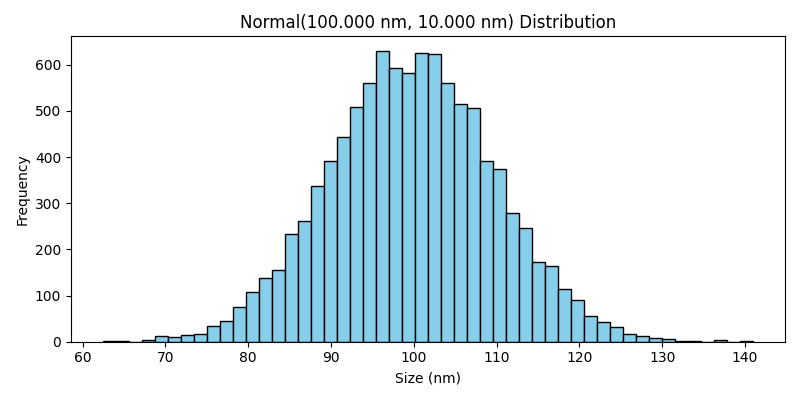
Normal#
The normal distribution generates values distributed around a mean with symmetric dispersion.
It is appropriate when fluctuations are approximately Gaussian and negative values are either physically excluded by bounds or unlikely within the chosen parameter range.
Log-normal#
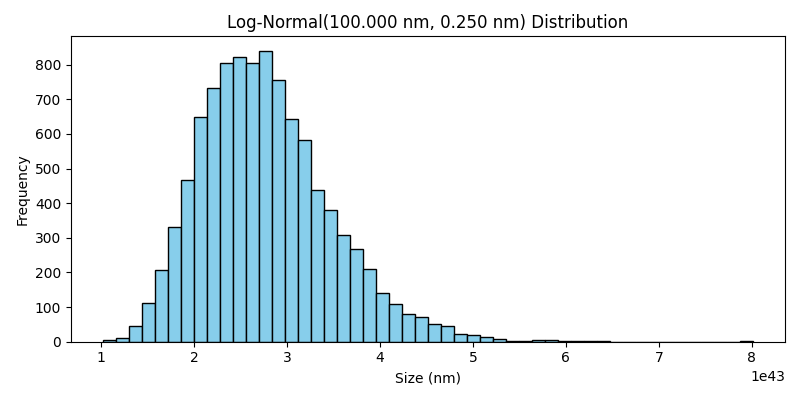
The log-normal distribution generates strictly positive values whose logarithm follows a normal distribution.
It is commonly used for particle sizes and other positive quantities with right-skewed variation.
Rosin-Rammler#
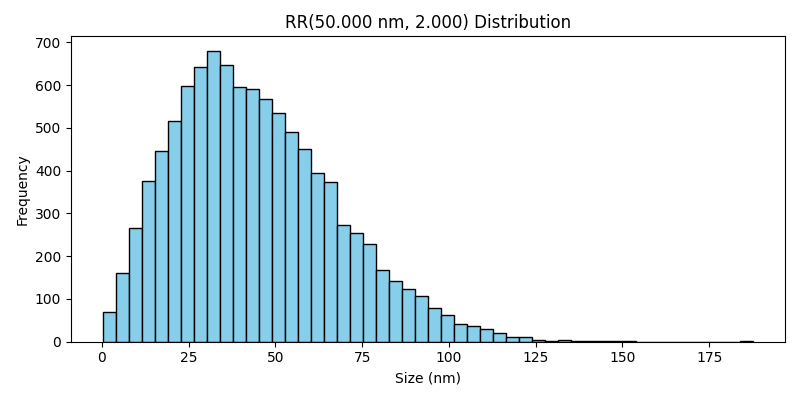
The Rosin-Rammler distribution is widely used to model particle size distributions in dispersed materials.
It is particularly useful when the population contains many small particles and progressively fewer large particles.
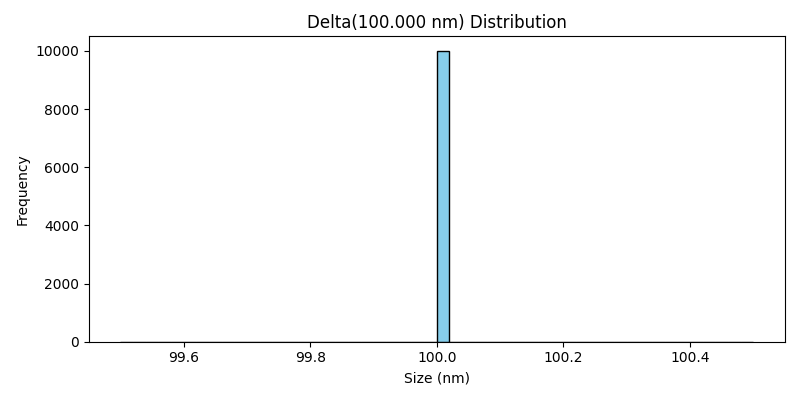
Delta#
The delta distribution represents a fixed value with no dispersion.
It is useful for monodisperse reference populations or for parameters that should remain constant across all simulated particles.
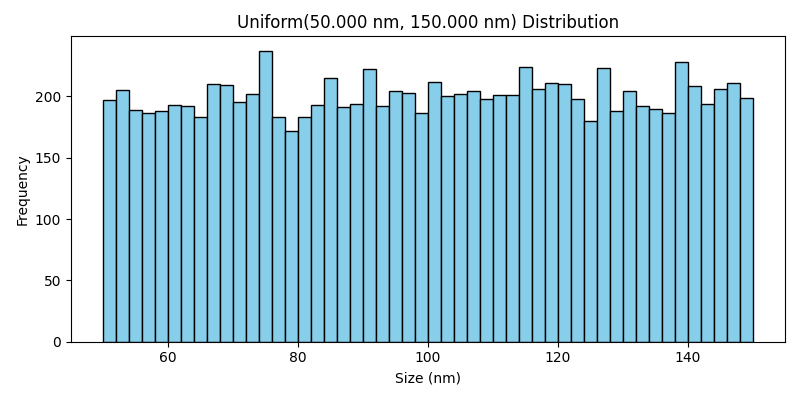
Uniform#
The uniform distribution samples values evenly between a lower and an upper bound.
It is appropriate when all values within an interval are considered equally likely.