
Note
Go to the end to download the full example code.
A full workflow example with PackLab#
This example shows the complete workflow of using PackLab to perform a Random Sequential Addition (RSA) simulation in three dimensions.
It demonstrates the following steps:
Create a simulation domain
Define a radius sampler for particle sizes
Configure simulation options
Construct and run the RSA simulator
Access the simulation statistics
Visualize the resulting configuration and pair correlation function
This is the recommended starting point when learning how to use PackLab.
from PackLab import monte_carlo, samplers
from PackLab import ureg
Simulation domain#
The domain defines the physical volume of the simulation. Here we use periodic boundary conditions on a cubic box.
domain = monte_carlo.PackingDomain(
    length_x=6.0 * ureg.millimeter,
    length_y=6.0 * ureg.millimeter,
    length_z=6.0 * ureg.millimeter,
    use_periodic_boundaries=True
)

radius_sampler = samplers.DiscreteRadiusSampler(
    radii=[0.1, 0.2] * ureg.millimeter,
    weights=[0.5, 0.5],
)

options = monte_carlo.RSAOptions()
options.random_seed = 123
options.maximum_attempts = 150_000
options.maximum_consecutive_rejections = 20_000
options.target_packing_fraction = 0.15
options.minimum_center_separation_addition = 0.0

rsa_simulator = monte_carlo.RSASimulator(
    domain=domain,
    radius_sampler=radius_sampler,
    options=options
)

result = rsa_simulator.run()

result.statistics.print()
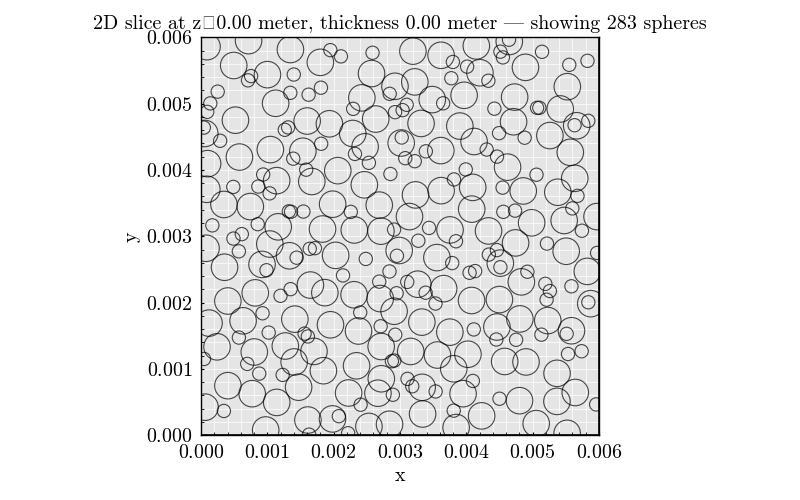
Visualise a central slice#
_ = result.plot_slice_2d(
    slice_axis="z",
    slice_center_fraction=0.5,
    slice_thickness_fraction=0.08,
    maximum_circles_in_slice=2500,
)
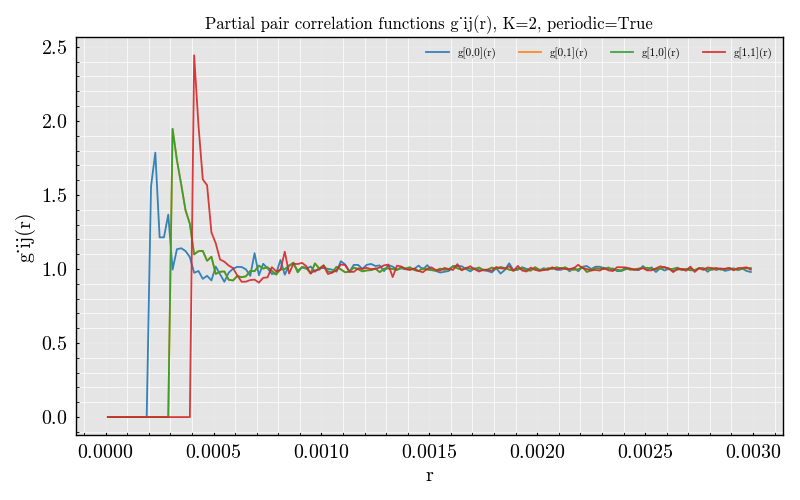
Plot the pair correlation#
_ = result.plot_pair_correlation(
    n_bins=150,
    maximum_pairs=200_000
)
Total running time of the script: (0 minutes 0.315 seconds)