
Note
Go to the end to download the full example code.
CoreShell: Coupling vs Diameter#
This example demonstrates how to compute and visualize the coupling efficiency as a function of core diameter for CoreShell scatterers using PyMieSim.
import PyOptik
from PyMieSim import from_pyoptik
Importing the package dependencies: numpy, PyMieSim
import numpy
from PyMieSim import (
    Measure,
    ureg,
    PhotodiodeSet,
    CoreShellSet,
    GaussianSet,
    PolarizationSet,
    Experiment,
)


polarization_set = PolarizationSet(
    angles=[90.0] * ureg.degree,
)

source = GaussianSet(
    wavelength=[0.5] * ureg.micrometer,
    polarization=polarization_set,
    optical_power=[1e-3] * ureg.watt,
    numerical_aperture=[0.2],
)

scatterer = CoreShellSet(
    core_diameter=[1000, 1250, 1500] * ureg.nanometer,
    shell_thickness=[800] * ureg.nanometer,
    core_material=[from_pyoptik(PyOptik.load_material(name="main/Ag/Johnson"))],
    shell_material=[from_pyoptik(PyOptik.load_material(name="specs/SCHOTT-optical/P-BK7"))],
    medium=[from_pyoptik(PyOptik.load_material(name="main/H2O/Daimon-19.0C"), medium=True)],
)

detector = PhotodiodeSet(
    numerical_aperture=[0.3],
    cache_numerical_aperture=numpy.linspace(0.0, 0.2, 200),
    phi_offset=[-180.0] * ureg.degree,
    gamma_offset=[0.0] * ureg.degree,
    sampling=[1000],
    polarization_filter=[1] * ureg.degree,
)

experiment = Experiment(scatterer_set=scatterer, source_set=source, detector_set=detector)

result = experiment.get(Measure.COUPLING)

print("Result dimensions and shape:", result.dims, result.shape)
print("Measure units:", result.attrs["units"])

result.plot(x="detector:cache_NA")
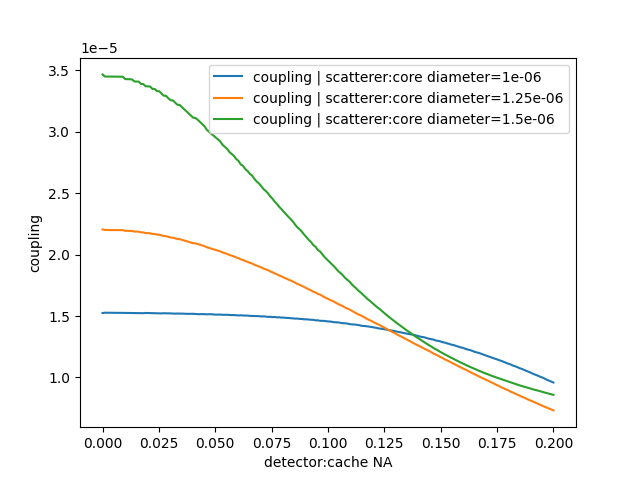
Result dimensions and shape: ('scatterer:core_diameter', 'detector:cache_NA') (3, 200)
Measure units: {'coupling': <Unit('watt')>}
Total running time of the script: (0 minutes 3.505 seconds)